


Lense: Disposable Event Camera
4.827.00 Reviews
App Specs
- Version
- 1.4.5
- Updated On
- License
- Free
- Downloads
- 50,000+
- Developer
- Rewaive B.V.
- Categories
- Events
- Platform
- Android, iOS
Screenshots
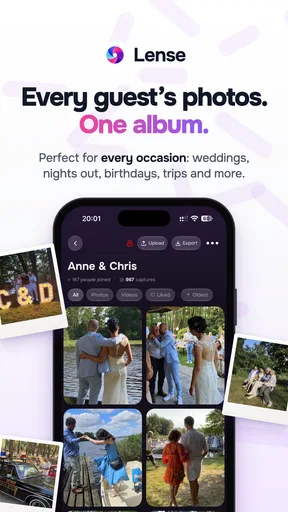
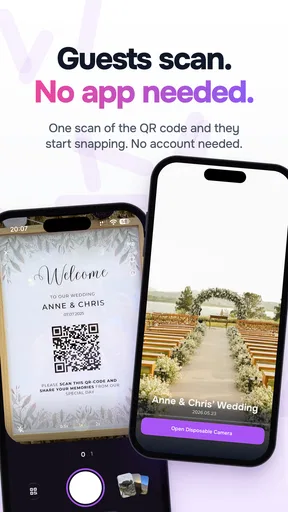
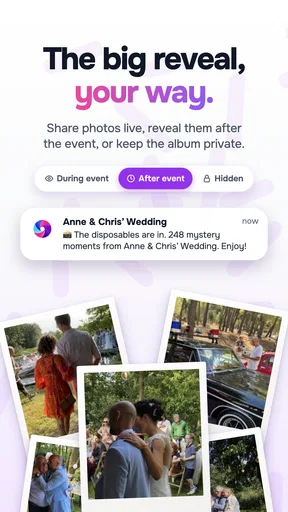
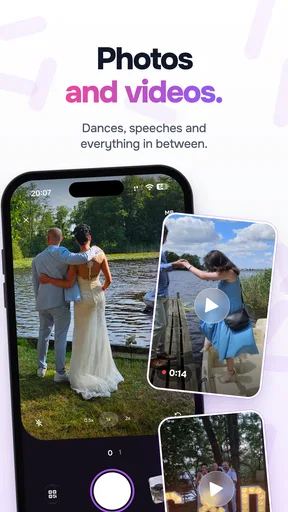
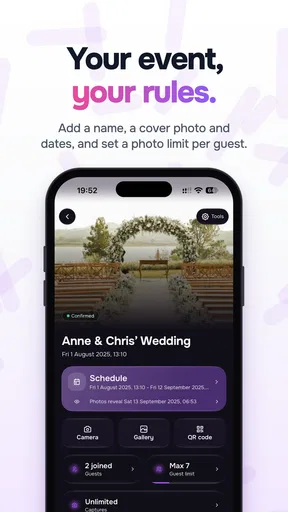
 Analysis by AppCompare
At a lively event, I usually want photos without turning the evening into a camera-management task. A phone’s regular camera makes it easy to take dozens of near-identical shots, then spend the next day sorting them. Lense: Disposable Event Camera takes a different approach: it makes each picture feel deliberate and puts some distance between taking a photo and seeing the result. That trade-off is the point, but it also means this is not the camera I’d choose for every occasion.
Choosing the right kind of camera for the occasion
Lense is an events app from Rewaive B.V., designed around a disposable-camera style of photography. I’d consider it when the goal is to remember the atmosphere of a gathering, not to produce a complete, carefully edited record. It can suit a birthday, a casual dinner, a party, or a group outing where everyone would rather be talking than reviewing shots on a screen.
That distinction matters before you start. A standard phone camera is better when I need immediate confirmation that a photo came out, want to adjust settings, or must capture something important without a second chance. Lense makes more sense when a little uncertainty is part of the fun and a limited set of pictures encourages me to put the phone away between moments.
The app is free to download, with in-app purchases listed from $5.49 to $109.99 per item. Its age rating is Everyone. It has a 4.8 average from around 960 ratings, and more than 50,000 installs. Those figures suggest that the concept has found an audience, though they don’t change the practical question: will delayed, limited event photography suit the way you like to take pictures?
From the first shot to the shared memory
I like to think of Lense as a small agreement with the people at an event: take a few pictures, resist the urge to check each one, and come back to the memories later. That works best when everyone knows the photos are meant as keepsakes rather than instant updates. From there, the useful question is how to make each shot count without turning the evening into a photo assignment.
Getting ready without overplanning
When I first downloaded Lense: Disposable Event Camera, I felt an immediate wave of nostalgia. Remember those days when you had to wait to see your photos until they were developed? This app brings a bit of that charm back, but with a modern twist. It’s super easy to install, and right off the bat, the interface is clean and intuitive. You don’t need a manual to start snapping away, which is a huge plus in my book.
The app’s current version is 1.3.7, and it runs on operating systems from version 7.0. Before an event, I’d open it once and get comfortable with the camera screen rather than trying to learn the flow in the middle of a toast or a crowded dance floor. The interface is intentionally simple, so there is little to configure, but knowing where the shutter is still helps when a moment happens quickly.
Worth Reading Before You Choose

Flipboard Shows What News Apps Must Do Beyond the Feed

Switching to Android Auto Means Rethinking Your Driving Routine

Google Calendar Makes a Crowded Week Easier to Manage

Ludo King Makes the Most of the Minutes Between Plans

Baby Panda World Brings Quick Play to Modern Phones, but Its Game Library Feels Busy

ESPN’s Live Game View Makes Following Close Games Easier
I’d also decide in advance what I want the pictures to do. If the aim is a handful of candid scenes from an evening, the disposable-camera framing encourages restraint. If I’m responsible for documenting a ceremony, a presentation, or a child’s first performance, I’d keep my regular camera ready instead. The novelty of waiting should never replace a reliable record of something I cannot recreate.
Taking pictures with a little more intention
Once you open the app, you’re greeted with a straightforward camera interface. It’s got that classic disposable feel, complete with a simple shutter button. What I love is how easy it is to just point and shoot. No complex settings or filters to mess around with—which is perfect for someone who just wants to capture the moment as it is.
Another neat feature is the limited number of shots. Just like a real disposable camera, you’ve got a set number of pictures you can take, adding a bit of excitement and anticipation to each click. It really makes you think about what you want to photograph, which I find refreshing in today’s world of endless digital storage.
One useful way to make that limit work for you is to give each shot a purpose: a wide view to establish the room, a candid interaction, a detail that captures the occasion, and a group photo before people leave. I wouldn’t treat that as a strict checklist, but it can prevent the familiar pattern of spending several pictures on the same scene and realizing later that the event’s character is missing.
For a realistic evening, imagine arriving at a friend’s birthday dinner. I might use the first few pictures on the decorated table and the guests settling in, then wait until a spontaneous moment rather than photographing every plate. Near the end, I’d save room for a group shot. The constraint makes me choose, while the simple camera keeps that choice quick; the cost is that I can’t inspect each result and immediately correct a missed focus or awkward expression.
Letting the pictures develop, then handing them on
After you’ve taken your photos, the app adds a bit of suspense by delaying the development process. You’ll have to wait a day or two before you can view your shots, just like in the old days. I found this feature both charming and a bit nerve-wracking. But when the photos finally "develop," there’s a sense of excitement and surprise that’s hard to find with instant digital photos.
That waiting period changes how I’d use the app with other people. I’d tell friends beforehand that the pictures won’t be ready to check immediately, especially if they’re expecting a quick group selfie to post during the event. It’s a small but important handoff: everyone needs to understand that the camera is for later, not instant approval or live sharing.
The delay also makes Lense a poor fit when the photos are needed for a same-night announcement, a work recap, or a time-sensitive post. In those cases, I’d switch to the usual phone camera, which gives immediate access and lets me choose, retake, and send a picture on the spot. Lense’s anticipation is enjoyable only when the occasion can wait.
The quality of the photos is surprisingly good. They have a unique, vintage aesthetic that you don’t often get with regular smartphone photos. It’s like having a built-in filter that gives your shots that cool retro vibe without any extra effort.
Once the pictures are ready, the next step is deciding what to share and with whom. Once your photos are ready, sharing them is a breeze. The app integrates seamlessly with social media platforms, so you can easily post your favorite moments for your friends and family to see. There’s also an option to order prints, which is a nice touch if you’re someone who likes to have physical copies of your memories.
For a group event, I’d think about the audience before posting. A photo that feels harmless among friends may not be one everyone wants on a public profile, so it’s worth checking with people before sharing a candid moment. The option to order prints is useful for someone who wants a tangible keepsake, while social sharing suits a group that mainly wants to pass highlights around digitally. Those are different outcomes, and the app’s value depends partly on which one matters to you.
Keeping an event collection useful afterward
I also appreciated the option to create albums within the app. It helps keep things organized, especially after a big event where you’ve maxed out your photo limit. You can name your albums and even add little notes, which is a fun way to relive the moments later on.
Albums and notes can make the eventual collection more meaningful than a loose batch of images. I’d name an album for the occasion and add a short reminder of a detail that might otherwise fade, such as why everyone was laughing in one frame. That’s a simple workflow advantage: the images are tied to a memory while the context is still fresh, rather than being left as unlabeled camera-roll files.
For a series of separate gatherings, I’d keep the collections distinct instead of mixing them together. That makes it easier to revisit one evening or share the right set with the people who were there. Still, Lense is best understood as an event-focused camera experience, not a replacement for every way you organize photos on a phone. If your priority is a searchable archive of all your pictures, a regular photo library may be more convenient.
Where the disposable approach can fall short
The main limitation is also the app’s defining idea: restricted shooting and delayed viewing remove control. You can’t rely on checking a frame immediately, taking another version, and moving on with certainty. In a dim room, a fast-moving scene, or a moment with people who won’t gather again, that uncertainty may be frustrating. I’d use Lense for atmosphere and candid memories, not as the only camera for high-stakes moments.
It also asks for patience from everyone involved. Some people enjoy the surprise; others want to see what they captured before they leave. If your group tends to share photos as they happen, the normal camera app is the easier choice. Lense works better when the group is comfortable treating photography as part of the evening rather than an instant-results service.
Compared with disposable film cameras, the app avoids carrying a separate camera and gives you a digital route to sharing and prints. Compared with a standard phone camera, it deliberately gives up immediate review and abundant shooting in exchange for a more considered pace. I see that as a specific creative trade, not a universal improvement. People who love controlling exposure, focus, and edits will likely prefer a conventional camera app; people who want a few surprise keepsakes may enjoy Lense more.
The price also deserves a quick check if you expect to use paid options. Downloading the app is free, but in-app purchases range from $5.49 to $109.99 per item. I’d decide what I need before making a purchase and avoid assuming that every event requires an upgrade. For someone simply curious about the disposable-camera idea, starting with the free app is the sensible way to see whether the waiting and limited shots feel enjoyable rather than restrictive.
Who I’d recommend it to
I’d recommend Lense to hosts who want a playful way to collect moments from a gathering, to friends who enjoy delayed surprises, and to anyone who takes too many nearly identical phone pictures and wants a reason to be more selective. It can also make a nice shared activity: one person can capture small scenes throughout an occasion, then the group can revisit them when they are ready.
I’d skip it as my main camera for travel documentation, professional event coverage, or anything where I need to verify a shot immediately. I’d also choose a regular camera if I’m trying to capture a particular person who may only be present briefly, or if poor lighting and fast action make a missed image especially likely. The app is most satisfying when the stakes are low and the unexpected result is part of the appeal.
A considered way to remember an occasion
Overall, Lense: Disposable Event Camera is a delightful app that blends nostalgia with modern convenience. It’s perfect for anyone who loves capturing events without the stress of managing a traditional camera or worrying about storage. The limited photos and delayed development add a unique twist that makes each shot feel special.
If you’re planning to attend a wedding, party, or any event where you want to focus on the fun rather than your phone, I’d highly recommend giving this app a try. It’s a fantastic way to capture memories in a way that feels both vintage and fresh. Plus, it’s just plain fun to use!
Pros
- Simple
- user-friendly interface.
- Unique disposable camera concept.
- No editing needed; instant results.
- Great for capturing event memories.
- Encourages spontaneous photography.
Cons
- Limited photo storage capacity.
- No option for photo retakes.
- Requires in-app purchases for extras.
- Lacks advanced editing features.
- Dependent on internet for backups.
FAQs for Lense: Disposable Event Camera
What makes Lense: Disposable Event Camera different from other camera apps?
Lense: Disposable Event Camera stands out by offering a unique, retro experience reminiscent of disposable cameras. It provides users with a nostalgic interface and develops photos after a set period, mimicking the anticipation of film development. This sets it apart from instant-edit apps, focusing on capturing moments authentically.
How does the photo development process work in Lense: Disposable Event Camera?
The app simulates the traditional photo development process by delaying the availability of photos. After taking pictures, users must wait a predetermined time before viewing them. This feature aims to recreate the suspense and excitement of waiting for film to develop, enhancing the nostalgic experience.
Is Lense: Disposable Event Camera suitable for professional photography?
While Lense: Disposable Event Camera offers a fun and nostalgic experience, it is not designed for professional photography. The app is ideal for casual users looking to capture moments with a vintage feel, but it lacks advanced editing tools and high-resolution outputs necessary for professional use.
Can I share my photos directly from the Lense app?
Yes, once your photos are developed, Lense allows you to share them directly from the app. You can easily post your images on social media or send them to friends via messaging apps, making it convenient to share your unique, retro-styled photos with others.
Are there any in-app purchases or ads in Lense: Disposable Event Camera?
Lense offers a free version with basic functionalities, but it may include ads. To enhance the user experience, the app provides in-app purchases for additional features, such as more camera filters or removal of ads. This allows users to customize their experience according to their preferences.


